Hi,
I’ve just deployed the Journey Docker container. After the initial start I went to https://myurl.com/admin, logged in with the default admin credentials, and changed the e-mail and password. I also created a new account with role: user (no admin rights).
To test the setup, I logged out from the admin account and signed in with the newly created user account. To my surprise, I still had access to the full user list. Even more concerning, the interface offered me an “Edit” option next to the admin account.
To verify whether this was just a UI glitch or an actual privilege escalation, I attempted to create a new admin account while logged in as the user. After checking in the MongoDB database, I confirmed that the new admin user was indeed created successfully.
In short: a normal user account is able to perform admin-level actions (creating new admin accounts).
Steps to reproduce:
1. Deploy the Journey Docker container (self-hosted).
2. Log in with the default admin credentials.
3. Create a new account with role: user.
4. Log out from admin, log in with the user account.
5. Open the user list, select “Edit” next to the admin account.
6. Create a new admin account.
7. Check the database — the new admin account exists.
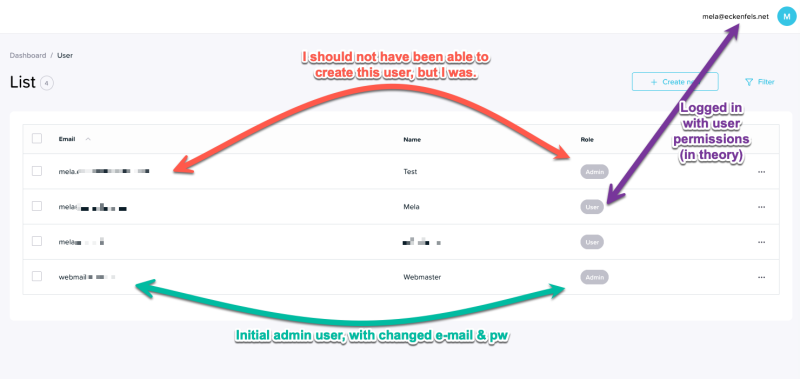
This seems like a serious security issue. Is this expected behavior in the current self-hosted release, or a bug? And if it’s a known limitation, is there a recommended mitigation until proper RBAC enforcement is in place?
Regards,
Mela
